SEO Title Length: The Quick Answer
The ideal SEO title length is 50 to 60 characters. That keeps most titles under about 580 pixels, the width Google shows on desktop before it cuts a title off. Google has no fixed character limit. It cuts titles by width, so capitals, wide letters and symbols use up the space faster than a character count suggests.
That's the number. The rest of this guide explains where it comes from, when going over it is fine, and how to write a title that fits without sounding cramped.
I measured every pixel width on this page with my free meta title length checker, which uses Arial at 20 px to match Google's desktop titles as closely as possible. Google changes its layout now and then, so treat the numbers as close estimates, not exact limits.
Check Your Title Length
Type or paste a title to see its length in characters and pixels, and how it would look on desktop.
0 characters · 0 / 580 px
yourwebsite.com
Your SEO title will appear here
Start typing to check your title.
For descriptions, the mobile view and every other meta tag on a page, use the full SERP preview tool or browse all free SEO tools.
1. What Is SEO Title Length?
SEO title length is the size of the text inside a page's <title> element, counted in characters or, more usefully, measured in pixels. That text is what Google usually shows as the clickable headline in search results, which Google calls the title link.
You'll see the same thing called the meta title, title tag, page title or SEO title. They all mean the <title> element in the page's HTML:
<title>Men's Running Shoes: Road, Trail & Racing | RunPro</title>SEO titles and meta descriptions work as a pair. The title is the headline people scan in the results. The description is the short summary underneath it, and Google often writes its own version of that from the page's text.
Whether you call it SEO title length, title tag length or meta title length, the same numbers apply.
2. How Long Should an SEO Title Be?
The best title tag length is 50 to 60 characters, kept under about 580 pixels wide. That range also has the best track record with Google. In Zyppy's study of 80,959 titles across 2,370 sites, Google rewrote titles of 51 to 60 characters least often, at around 40%. Titles over 70 characters were rewritten 99.9% of the time.
| Guideline | Target | Why |
|---|---|---|
| Characters | 50 to 60 | Fits most titles and is the least rewritten length |
| Desktop width | Under about 580 px | Google cuts the title link to fit the result width |
| Mobile | Up to two lines | Titles usually wrap instead of being cut |
| Minimum | About 30 characters | Titles of 20 characters or fewer were rewritten over half the time |
| Key words | Within the first 50 characters | They stay visible even if the end is cut |
There's no official title tag character limit. Google's documentation says "there's no limit on how long a <title> element can be," but the title link "is truncated in Google Search results as needed, typically to fit the device width." So 50 to 60 characters is a guideline based on what fits on screen, not a rule Google enforces.
3. Why Pixels Matter More Than Characters
Character counts are a shortcut. Google doesn't stop at a set number of characters; it runs out of room. At title size, 30 capital Ws fill the whole 580 px line, while 130 lowercase i's would fit in the same space. So two titles with the same character count can take up very different widths.
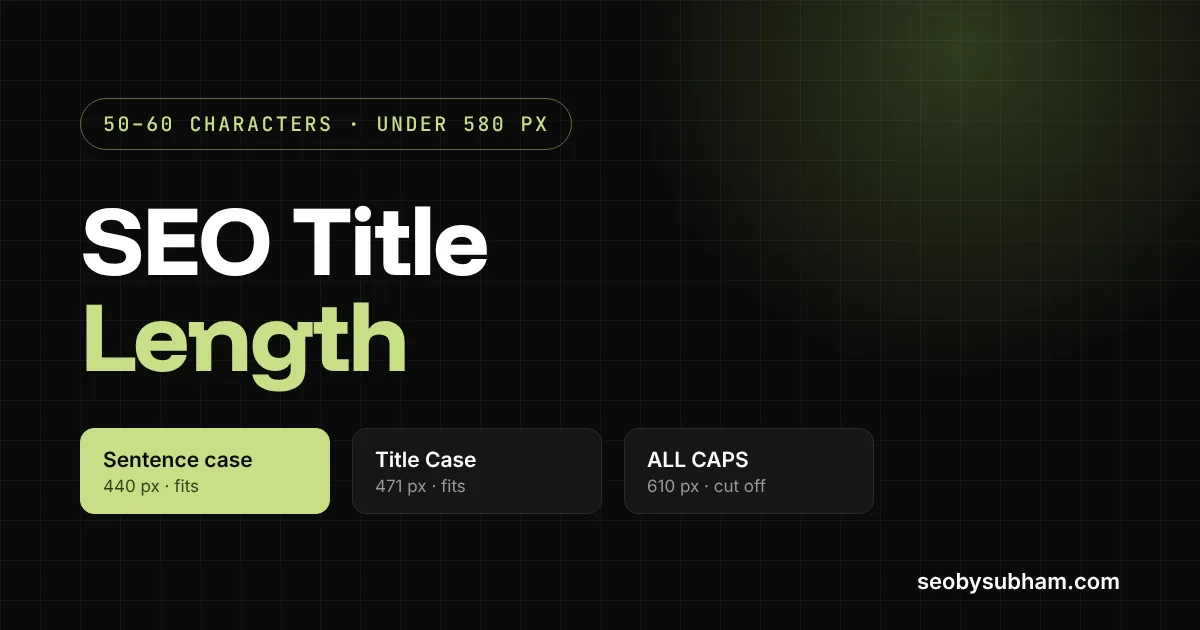
Here is one 56-character title written three ways, measured at Google's title size:
| Style | Title | Width | Result on desktop |
|---|---|---|---|
| Sentence case | Best hiking trails in Utah for families with little kids | 440 px | Fits with room to spare |
| Title Case | Best Hiking Trails in Utah for Families With Little Kids | 471 px | Fits |
| All caps | BEST HIKING TRAILS IN UTAH FOR FAMILIES WITH LITTLE KIDS | 610 px | Cut off: "…FAMILIES WITH …" |
A typical mixed-case title averages close to 10 pixels per character, which is why the 50 to 60 character rule usually works. It fails for titles packed with capitals and wide letters, and it's needlessly strict for titles made of short lowercase words.
If your title has lots of capitals, Ms and Ws, aim nearer 50 characters. If it's mostly lowercase words, you can often go a little past 60 and still fit. When in doubt, measure it.
4. What Happens If Your Title Is Over 60 Characters?
Your ranking doesn't drop because a title is long. What changes is how the title looks in the results. One of three things usually happens:
- It gets cut off. On desktop, Google shows what fits and ends the line with an ellipsis (…), so readers never see the end.
- It gets rewritten. In Zyppy's data, titles over 60 characters had more than a 76% chance of being rewritten, rising to 99.9% above 70 characters.
- It shows in full. If the words are narrow, a 62 or 65 character title can still fit under 580 px.
Google still has your full title tag. The cut only changes what searchers see. Google's Gary Illyes has described title length as one of the "externally made-up metrics" and said there can be value in titles longer than the space Google displays (reported by Search Engine Land).
So the risk of a long title is the click, not the ranking. If the words that make someone choose your result are hidden after the cut, fewer people choose it.
Rewrites also happen at every length. A Search Engine Land analysis of Q1 2025 results found Google changed about 76% of title tags. A title that fits doesn't guarantee Google will use it, but a clear, accurate title of the right length gives it the best chance.
5. Desktop vs Mobile Title Length
Desktop is the stricter limit. There, the title link sits on a single line, so anything past roughly 580 pixels is cut. On mobile, titles usually wrap onto a second line, so more of a long title tends to show.
Because the same title tag serves both, write for desktop, and mobile will take care of itself. On mobile, watch the start of the title. The site name and icon sit above it, and the first few words are what people read before they scroll on.
6. Does Title Length Affect Rankings or Clicks?
What the title says matters more than how long it is. Google uses it to understand what the page is about, and searchers use it to decide whether to click.
Clicks are where length makes a difference. Zyppy's look at around a quarter of a million URLs found traffic tended to peak for titles of about 55 to 60 characters. That is a correlation, not proof that length causes clicks, and other studies put the sweet spot elsewhere.
The practical lesson is simpler. Titles that show in full and say exactly what the page offers do better than titles that are cut, vague or stuffed with keywords. So the title changes worth making first are rarely about trimming characters. Move the main keyword and the reason to click into the first half, and remove any boilerplate that pushes them out of view.
7. How to Write an SEO Title That Fits
A simple order works for most pages:
- Start with the main keyword or topic, the words someone would type to find the page.
- Add the detail that makes your page the better choice: a year, a number, a location, a format or the main benefit.
- End with your brand name if there's room, after a dash or pipe. On your homepage, the brand can come first.
- Read it out loud. If it sounds like a list of keywords, rewrite it.
Before and after: four titles, measured
| Page | Before | After |
|---|---|---|
| Local business homepage | Home | Smith & Sons Plumbing and Heating Services Ltd – Serving Austin, Round Rock and Cedar Park Since 1987 108 characters, 1,032 px. Shows as "Home | Smith & Sons Plumbing and Heating Services Ltd …" | Austin Plumber & Heating Repair | Smith & Sons Plumbing 55 characters, 520 px. Fits. |
| Long guide | The Ultimate, Complete, Step-by-Step Guide to Baking Sourdough Bread at Home for Beginners (Updated) 100 characters, 948 px. Cut after "Guide to Baking …" | How to Bake Sourdough Bread at Home: A Beginner's Guide 55 characters, 540 px. Fits. |
| Software feature page | Features 8 characters. Too vague, and very likely to be rewritten. | Invoice Automation Software for Small Teams | Billwise 54 characters, 486 px. Fits. |
| Online store category | Running Shoes | Running Shoes for Men | Best Running Shoes Online | Free Shipping | RunPro 90 characters, 850 px. Cut after "Best Running …" | Men's Running Shoes: Road, Trail & Racing | RunPro 50 characters, 474 px. Fits. |
None of the "after" titles came from counting characters. Each one says what the page is in plain words, adds one reason to choose it, and puts the brand last. The length followed from that.
8. Common SEO Title Mistakes to Avoid
- Boilerplate first. "Home | Company Name Ltd" spends the most visible part of the title on words nobody searches for.
- Keyword stuffing. Repeating a phrase, as in the running shoes example, is something Google's title guidance asks you to avoid.
- The same title on many pages. Google's documentation specifically warns against repeated or boilerplate titles.
- Titles that are too short. One-word titles like "Features" or "Services" tell searchers nothing and are usually replaced.
- All caps. Harder to read and, as measured above, about 40% wider than the same words in sentence case.
- Brackets everywhere. In Zyppy's data, titles with square brackets were rewritten 77.6% of the time, well above the overall rate.
- A title that doesn't match the page. If the title promises something the page doesn't deliver, Google is more likely to swap it, and people who do click leave quickly.
9. How to Check Your SEO Title Length
- Use a pixel-based checker. My free title tag checker measures characters and pixels, shows where Google would cut the title on desktop and mobile, and can pull the title from any live URL.
- Check what Google actually shows. Search for a query your page ranks for and compare the title link with your title tag. If they differ, Google rewrote it. Search Console's Performance report shows which queries to try.
- Audit the whole site. A crawler such as Screaming Frog lists every title with its length and pixel width, so you can sort by the longest and fix those first.
If you use WordPress, Yoast SEO and Rank Math both show a length bar under the SEO title field. Treat it as a guide, then confirm the important pages with a pixel preview.
10. What to Do If Google Rewrites Your Title
A rewrite means Google thinks other text on your page describes it better for that search. That isn't always bad, so check before you change anything.
- See what Google used instead. According to Google's documentation, Google can use the page's main heading, other prominent text, or the anchor text of links pointing to the page. That tells you how Google reads the page.
- Fix the cause. If your title was cut, shorten it. If it repeats keywords or boilerplate, clean it up. If it says something different from your H1, bring the two closer together.
- Ask Google to look again. Use URL Inspection in Search Console and request indexing after the change.
- Compare fairly. Give it two to four weeks, then compare the page's clicks and click-through rate in Search Console for the same number of days before and after the change.
Sometimes Google's version gets more clicks than yours. If it does, treat it as a hint for your next title rather than a problem to fight.
11. What About Meta Description Length?
Descriptions follow the same logic with more room. Google typically shows around 920 pixels of description on desktop, about 155 characters, and around 680 pixels on mobile, about 120 characters. Google also rewrites descriptions often, usually by pulling a passage from the page that better matches the search.
You can check the title and description together, on desktop and mobile, with the meta title and description checker.
12. Frequently Asked Questions
Short answers to the questions people ask most about SEO title length.
How many characters is a meta title?
A meta title works best at 50 to 60 characters. There is no official meta title character limit, but on desktop Google cuts titles that run wider than about 580 pixels, which most titles reach somewhere between 55 and 65 characters.
Is a 70-character title too long?
Usually, yes, on desktop. At close to 10 pixels per character, most 70-character titles run past 580 px and the end gets cut. If the extra words matter, keep them, but put the important part first.
Do spaces and punctuation count toward title length?
Yes. Spaces, punctuation and symbols all take up width. A space is narrow, but a separator such as " | " adds three characters, and several of them in one title add up quickly.
Should I put my brand name in the SEO title?
Usually, yes, kept short. Google's guidance is to brand titles concisely. On inner pages, put the brand at the end after a dash or pipe. On the homepage it can come first. If space is tight, the brand is the first thing to drop.
How long should a title be in other languages?
Measure in pixels rather than relying on an English character count. Chinese, Japanese and Korean characters are roughly twice as wide as English letters, so far fewer fit, and German titles with long compound words fill the space faster too.
Should the SEO title be the same as the H1?
They don't have to match, but they should agree. The H1 can be longer and more natural, while the title is tighter. Google lists the page's main visible heading among the sources it can use for title links, so a big mismatch makes a rewrite more likely.
Which separator should I use in an SEO title?
A dash or a pipe both work. Use one, with a space on each side, to separate the topic from your brand. In Zyppy's study, pipes were replaced or removed 41% of the time, often swapped for a dash, so a dash is the slightly safer choice.
Should I put the year in my SEO title?
Only when the content changes by year, such as prices, rules or best-of lists. A year adds about five characters and has to be updated, because an old year in the title makes the page look out of date.
What is the 80/20 rule in SEO?
It's the Pareto principle applied to SEO: a small share of your pages or keywords, often around 20%, usually brings most of your traffic. For titles, it means fixing the pages with the most impressions in Search Console first, because that's where better titles make the biggest difference.
How do I change my SEO title in WordPress?
With Yoast SEO or Rank Math installed, open the page or post, find the plugin's box below the editor and edit the SEO title field there. Without an SEO plugin, most themes use the post title as the title tag, so changing the post title changes it.

A Good Title Wins the Click. Links Get You Seen.
A clear title helps people choose your result, but the page still has to rank high enough to be seen. That depends on your content and your links, and building links by hand is what I do for clients every month, with a live report of every link.