1. What Are Web 2.0 Backlinks?
Web 2.0 backlinks are links to your website from content you publish yourself on free, user-generated platforms: blogging sites such as WordPress.com and Tumblr, and site builders such as Google Sites, Wix and Strikingly. You set up the blog or page, write the content, and place a link to your own site inside it.
The name is borrowed from the “Web 2.0” era of the internet, when websites started letting ordinary people publish instead of just read. That's why a search for “web 2.0” still turns up history lessons. In SEO, web 2.0 just means these self-published properties and the links that come from them.
Three things make Web 2.0 links different from the backlinks most people picture when they read about link building:
- You control them. You choose the platform, the words around the link, the anchor text and where the link sits.
- The platform is strong, your page isn't. WordPress.com has a Domain Authority in the 90s. Your brand-new subdomain on it starts with none of that authority for itself.
- Nobody vouched for you. An editor didn't decide your page was worth citing. You did. That's the part people tend to forget, and it's the reason these links work best as support rather than as the main event.
A Web 2.0 backlink is a link you gave yourself on someone else's platform. Treat it that way and you'll use it well. Expect it to act like a link from a respected publication and you'll be disappointed.
2. Do Web 2.0 Backlinks Still Work?
Yes, as supporting links. Web 2.0 backlinks add variety to a thin backlink profile, put your brand name on more trusted domains, help new pages get discovered, and give you a few links where you can control the anchor text. They don't replace links from real websites that chose to mention you, and on their own they rarely move a competitive keyword.
If you've read around, you've probably seen two opposite answers. One camp says Web 2.0s are dead because “they're all nofollow.” The other sells packs of “high DA web 2.0 backlinks” as if the platform's authority flows straight to you. Both are off.
The nofollow claim doesn't hold up. Of the 14 popular platforms I tested in September 2026, 12 passed a normal dofollow link, and 11 of those were on pages Google is allowed to index. You'll find them all in the next section. The “high DA” pitch is the bigger problem. Tumblr's authority belongs to Tumblr. A new post on a new Tumblr blog has no links pointing at it, so it has very little to pass on until it's indexed, has some content around it, and ideally gets a link or two of its own.
Then there's Google. Its link spam policy doesn't mention Web 2.0s by name, but it does cover links created mainly to manipulate rankings. A hundred thin blogs spun up in an afternoon fit that description perfectly. A handful of genuinely useful posts on platforms where your audience actually spends time don't.
Good Uses for Web 2.0 Links
- New sites: a few relevant links while you work on earning editorial ones.
- Brand and anchor variety: natural mentions of your brand and URL on trusted domains.
- Topical context: content on your subject that links to the right page on your site.
- Real readers: Tumblr, dev.to and Medium have communities that can send actual visitors.
Where People Get Burned
- Rank a tough keyword alone: competitive pages still need links from real, relevant sites.
- Pass on the platform's DA: a DA 94 platform doesn't give you a DA 94 link.
- Survive automation: spun, software-made blogs get ignored or deleted.
- Fix weak pages: links amplify a good page; they can't rescue a thin one.
3. Best Web 2.0 Sites for Backlinks
Most Web 2.0 sites lists online (you'll also see them called web 2.0 submission sites or web2.0 sites lists) are the same DA table copied from one blog to the next. The trouble is that a DA score tells you nothing about whether a link on that platform actually passes anything, or whether Google will even index the page.
So before any platform goes into client work, I test it. I publish a post with a link, then check two things in the page code: the rel attribute on the link, and whether the page carries a noindex tag. These are the results from my September 2026 check.
Well-Known Web 2.0 Submission Sites That Pass the Test
| Platform | Type | Platform DA | Link type | Indexable | Notes |
|---|---|---|---|---|---|
| Google Sites | Site builder | 96 | Dofollow | Yes | Clean and fast. Easy to shape into a small, believable mini-site. |
| WordPress.com | Blog | 94 | Dofollow | Yes | My first pick. Give it an About page and a few posts, not just one. |
| Telegraph (telegra.ph) | Instant page | 93 | Dofollow | Yes | No account and no blog around it. Fine for one or two pages, not more. |
| Ameblo | Blog | 93 | Dofollow | Yes | Works well, but the dashboard is in Japanese. Good for extra variety. |
| Strikingly | Site builder | 86 | Dofollow | Yes | Suits a one-page brand site with a clear link back to you. |
| dev.to | Developer blog | 85 | Dofollow | Yes | Only for tech topics. The community reads, comments and moderates. |
| Wistia | Video host | 81 | Dofollow | Yes | The link sits in the video description. Worth it only if you make video. |
| Tumblr | Blog | 77 | Dofollow | Yes | Still indexes well. Use tags properly and post more than once. |
| Wix | Site builder | 72 | Dofollow | Yes | Blog posts on a free wixsite.com address work fine. |
| Notion (notion.site) | Public page | 62 | Dofollow | Yes | Publish the page publicly and switch on search engine indexing first. |
| Site123 | Site builder | 59 | Dofollow | Yes | Lower DA, but the link is clean. Useful for variety. |
Platforms to Check First or Skip
These three show up on almost every list of high authority web 2.0 sites, and it's easy to see why: their DA scores are huge. For passing link value, though, they fall short, so I don't count them as Web 2.0 backlinks.
| Platform | Platform DA | What the test showed | Verdict |
|---|---|---|---|
| Medium | 95 | Links in posts carry rel="ugc nofollow" | Brand only Good for readers and visibility, not link value |
| Substack | 92 | Dofollow link, but the post page carried a noindex tag | Check first Only count it if the page is indexable |
| Adobe Express | 96 | Nofollow link on a noindex page | Skip No SEO value |
The platforms above are the well-known ones, shared so you can see how the test works. The list I actually use for client campaigns is much bigger: niche blogging platforms, site builders and publishing sites that pass the same dofollow and indexing checks, and I re-test them regularly.
I keep that full list private on purpose. Once a platform turns up on public “free web 2.0 sites” lists, it gets flooded with spam blogs, and sooner or later it switches links to nofollow, starts noindexing new posts or deletes accounts in bulk. Keeping the list private is how those platforms stay useful for clients. If you order, your report shows exactly which platforms were used for your site.
Check Any Web 2.0 Link in 30 Seconds
Platforms change their link settings without telling anyone, which is why I re-test them rather than trusting an old list. On any post, right-click your link and choose Inspect. If you see rel="nofollow", rel="ugc" or rel="sponsored", the link is marked so Google treats it as a hint, not an endorsement. Then press Ctrl+U to view the page source and search for noindex. If it's there, Google won't index the page, and a link on a page that isn't indexed isn't doing much for you.
4. How to Build Web 2.0 Backlinks
Creating a Web 2.0 backlink takes ten minutes. Creating one that gets indexed, stays live and looks like a real blog takes longer. If you're working out how to create web 2.0 backlinks that last, these are the steps I follow.
Pick Platforms That Fit
Match the platform to your topic: dev.to for software, Tumblr for lifestyle and creative work, WordPress.com or Google Sites for almost anything. Check the link type first, using the 30-second test above.
Set It Up Like a Real Blog
A name that reads like a blog, not a keyword string. A short About page, a profile image or logo, and a theme you've actually looked at. Empty shells with one post are what get ignored.
Write for a Reader
An original article of 600 words or more that answers a real question in your niche. No spinning. If you use AI for a draft, rewrite it properly and add something only you know, like a number or an example.
Place One Link, in Context
Put your link inside a paragraph where it genuinely helps the reader, and point it at the most relevant page, not always your homepage. Linking out to one or two other good sources makes the post look natural too.
Vary the Anchor Text
Mix your brand name, your bare URL, natural phrases and only the occasional keyword. In my own report the anchors include “SEO by Subham”, “Discover more” and “white hat link building”, spread across different platforms.
Get It Indexed, Keep It Alive
Share the post, link to it from one of your social profiles, and give it a few days. Search site: plus the post URL on Google to see if it's indexed. Add a second post a few weeks later so the blog doesn't look abandoned.
One small extra that helps: give each post a proper title and meta description, the same as you would on your own site. If you want a quick sense check on length and wording, my free Meta Title & Description Checker works on any page.
5. Where Web 2.0 Links Fit in Your Link Profile
The easiest way to think about a Web 2.0 backlinks strategy is in layers. Each layer does a different job, and the top layer matters most.
A Healthy Backlink Profile, in Three Layers
Web 2.0 blogs sit in the middle: more useful than a bare profile link, far less weighty than an editorial placement.
Editorial Links
Outreach links and guest posts on real, niche-relevant websites. These carry the most weight.
Web 2.0 Blogs
Unique articles on your topic, with a contextual link. Topical support and anchor variety.
Foundation Links
Profiles, citations and listings that establish your brand name and URL across the web.
My own link building packages are built on this shape. The Starter plan, for example, has 1 outreach link, 15 Web 2.0 blogs and 150 foundation links. The counts look upside down, but the weight runs the other way: that single outreach link does more than any other link in the package. The Web 2.0s and foundation links are there so the profile around it looks like a real brand's, not a site that only ever got one kind of link.
Some SEOs also point a few Web 2.0s at a guest post or an existing backlink to help it get crawled (often called tier 2). It can help a slow-to-index placement, but keep it light. Stacking dozens of links on one page is exactly the kind of pattern that looks built rather than earned.
And if your site already has a strong editorial profile, extra Web 2.0 backlinks won't add much. Put that budget into more outreach instead.
6. Common Mistakes to Avoid
When Web 2.0 links go wrong, it's nearly always one of these.
- Buying “500 Web 2.0 backlinks” packs. At that price the blogs are made by software, filled with spun text and built on the same template. Most never get indexed, and the ones that do look like a network.
- One post, then nothing. A blog with a single post and a link is the easiest pattern in the world to spot.
- The same exact-match anchor every time. Real people don't all link with the words “best plumber Dallas.”
- Trusting platform DA. Adobe Express has a DA of 96, yet its links are nofollow and its pages are noindex.
- Never checking the link. Nofollow and noindex settings change. Test your posts, and test them again later.
- Hiding footprints instead of writing well. Some sellers promise a different IP address for every blog. If your links need hiding, that's the real problem.
7. Web 2.0 Link Building Service
If you'd rather not build and maintain these yourself, my web 2.0 link building service does the work described above for you. Whoever you hire, the best web 2.0 link building service should give you everything in the list below as standard, not as an upsell. What's different about mine is that I treat Web 2.0 links as one part of a link plan, not as a bulk product.
What You Get With Every Web 2.0 Blog
- A unique article on your topic. Written for that blog, never spun or copied.
- A contextual link. Inside the article where it makes sense, not in a footer or bio.
- Planned anchor text. Mixed with your other links so the profile doesn't look forced.
- A full report. Every live URL, platform and anchor text, so you can open and check each link yourself.
- A clear timeline. You know when the work will be delivered before you pay.
- A full refund if you're not happy. No arguments. See the refund policy.
Packages and Pricing
Web 2.0 blogs are included in every monthly backlink package, alongside outreach and foundation links: 15 Web 2.0 blogs in Starter ($50/month), 25 in Growth ($95/month) and 40 in Authority ($170/month). Need a custom number, or Web 2.0 links to support a campaign you're already running? Get in touch and I'll tell you honestly whether they're worth it for your site.
Who This Service Is For
- New and small business sites with very few backlinks.
- Bloggers and affiliate sites that need more variety in their profile.
- Agencies that want supporting links built under their outreach work.
Who Should Look Elsewhere
- Anyone expecting Web 2.0s alone to rank a competitive keyword.
- Sites with a manual penalty. That needs a cleanup first, not more links.
- Buyers looking for hundreds of links for a few dollars.
8. See a Real Example
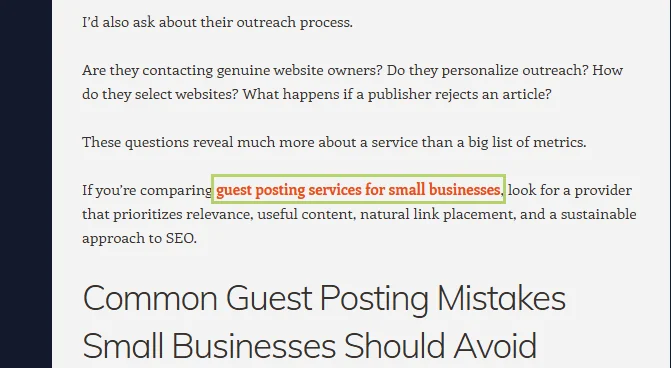
Here's part of one of the Web 2.0 posts I built for this website, on WordPress.com. The article is about choosing guest posting services, and the link (highlighted) sits in a sentence where it's actually relevant. I checked it: it's a normal dofollow link on an indexable page.
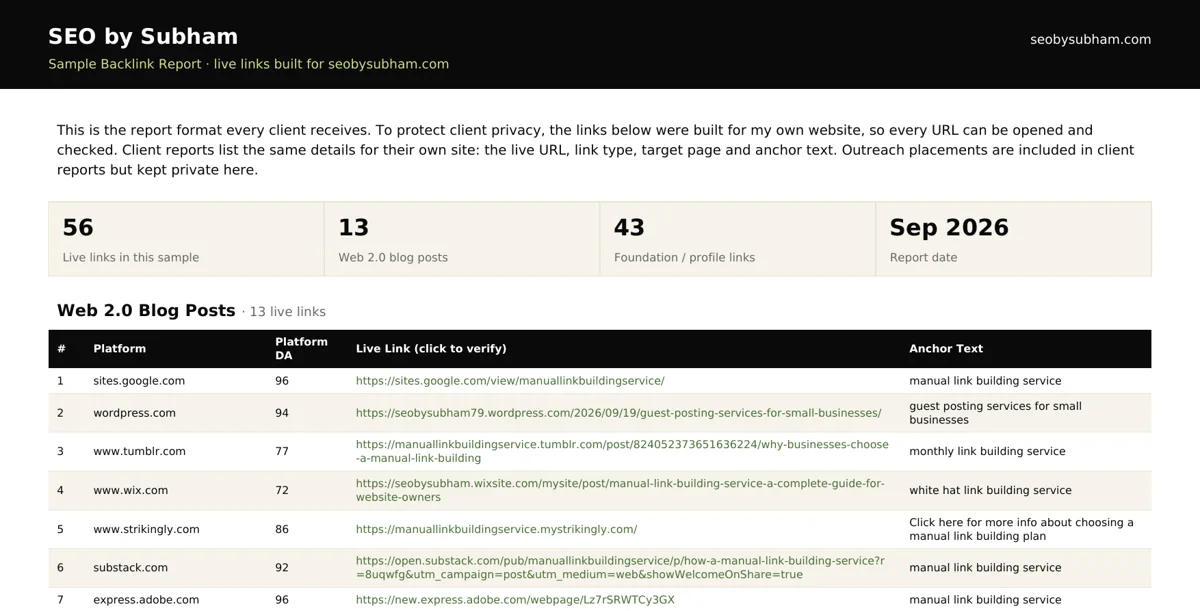
Every client gets a report in the same format as my sample backlink report. It lists Web 2.0 posts built for this site, each with the platform, its DA, the live link and the anchor text. Every link in it is live, so you can click through and check every one.
9. Web 2.0 vs Guest Posts vs Foundation Links
People often ask which of these they should buy. The honest answer is that they do different jobs, and a healthy profile has some of each.
| Link type | Who places it | SEO weight | Best for |
|---|---|---|---|
| Guest posts / outreach | An editor on a real site in your niche | High | Rankings, authority and referral traffic. See guest posting services. |
| Web 2.0 blogs | You, on a free platform | Low to medium | Topical support, anchor variety, new sites |
| Foundation links | You, on profiles and listings | Low | Brand mentions and a natural base |
If your budget is tight, start with one or two editorial links and add Web 2.0 support around them, not the other way round. If you're new to all of this, my guide to what link building is explains how editorial links earn their weight.
10. Frequently Asked Questions
Straight answers to the questions I get most about Web 2.0 backlinks:
Web 2.0 links, also called Web 2.0 backlinks, are links to your website from content you publish yourself on free, user-generated platforms, such as a blog on WordPress.com or Tumblr, or a small site on Google Sites or Wix. You create the page and place the link, so they work as supporting links rather than editorial votes from other websites.
Many are, but not all. Of the 14 platforms I tested in September 2026, 11 passed a normal dofollow link on an indexable page. Medium tags links as “ugc nofollow”, Adobe Express uses nofollow on a noindexed page, and a Substack post can carry a noindex tag. Always inspect the link on the post itself, because platforms change these settings.
A small number of real, well-written Web 2.0 blogs with a natural anchor mix are low risk. The risk comes from automation: hundreds of software-made blogs with spun content and the same exact-match anchor. That pattern fits Google's description of link spam, and those links are usually ignored at best.
Google can take manual action against link schemes, so building Web 2.0 links at scale purely to manipulate rankings carries real risk. A handful of genuine posts alongside editorial links is a very different pattern. No one can honestly guarantee a link type is penalty-proof, which is why I keep Web 2.0s as supporting links rather than the main strategy.
There's no magic number. What matters is the ratio: Web 2.0 links should support your editorial links, not outnumber them by hundreds to one with nothing else around them. My monthly packages include 15 to 40 Web 2.0 blogs alongside outreach links and foundation links, which is a reasonable range for most small and mid-sized sites.
Anywhere from a few days to a few weeks, and some posts never get indexed at all. Sharing the post, linking to it from a social profile and adding a second post to the blog all help. You can check a post with a site: search on Google followed by the post URL.
The platforms are free, but the work isn't. A Web 2.0 link is only worth having if the post is original, the link sits in context and the page gets indexed. If you have the time to do that properly, they're worth adding. If you don't, it's cheaper to buy the work from someone who does it well than to rush out empty blogs.
A guest post is published by an editor on a real website in your niche, so the link carries more weight and can send real readers. A Web 2.0 link sits on a blog you created yourself on a free platform. Guest posts build authority; Web 2.0 links support it. You can see how I handle the first kind on my guest posting services page.
No. A private blog network (PBN) is a group of websites on their own domains, often expired ones, that someone owns and controls to link to their money sites while hiding that they're connected. Web 2.0 links sit on subdomains or profiles of public platforms like WordPress.com or Tumblr, in plain sight. Both are self-made links, but PBNs are specifically named in Google's spam policies and carry far more risk.
Buy the work, not a number. Before paying anyone, ask to see a sample post and a sample report (here's mine), check whether their links are dofollow and indexed, and ask what else they'd build alongside them. If a seller offers hundreds of Web 2.0 backlinks for a few dollars, walk away.

Let Me Handle Your Web 2.0 Backlinks
Unique articles, contextual links, a sensible anchor mix and a report you can check line by line, as part of a link plan that also includes real outreach links.