Link Building Report Template: The Short Answer
A link building report lists every link built in a period, with its live URL, date, type, anchor, target page and status, plus a short summary of results. This free template gives you both parts in one unbranded Excel file, with no email gate.
It’s the same layout I send to manual link building clients and agency partners: a link log that grows through the month, and a one-page summary the client actually reads.
Free Excel template, no signup. Add your logo and it’s ready for your first client.
Download the Free Link Building Report Template
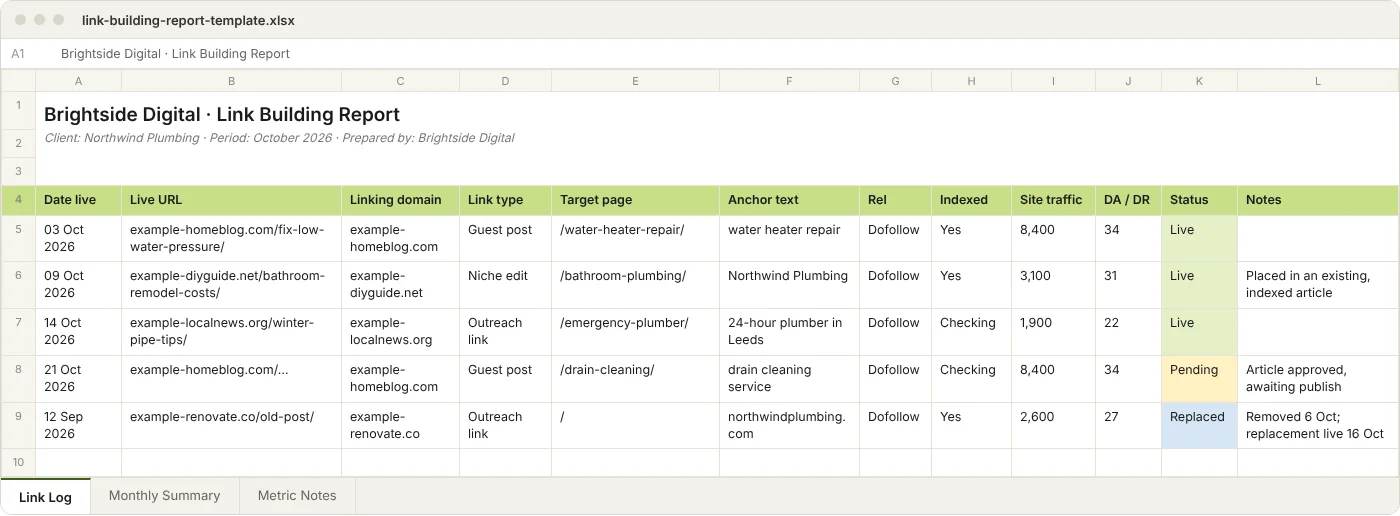
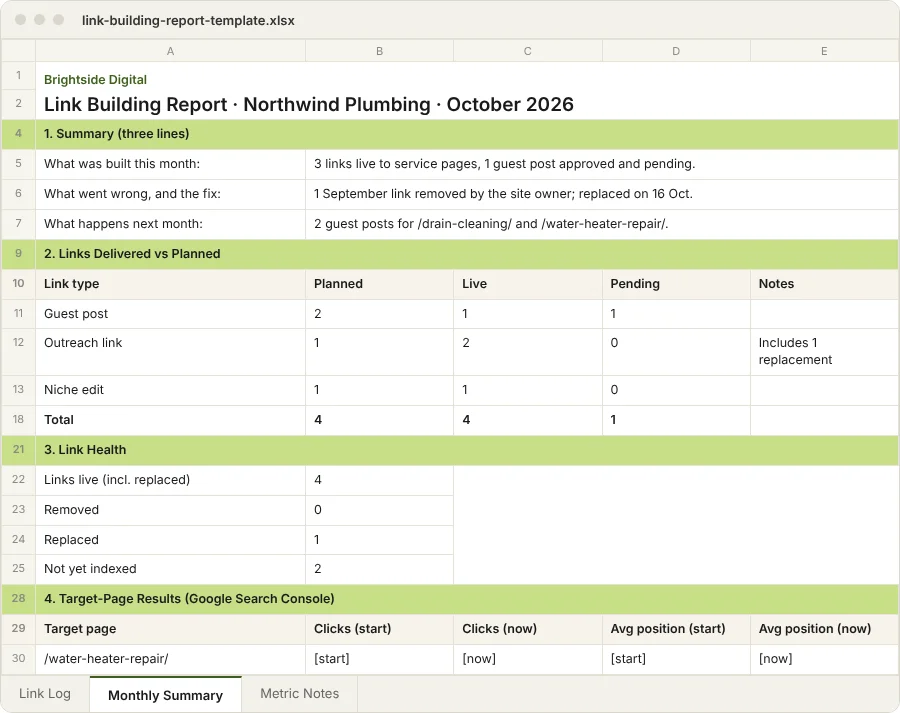
The file has three tabs. You fill in the first, copy the key numbers into the second, and keep the third as a reference for your team.
| Tab | What it’s for | Who reads it |
|---|---|---|
| Link Log | One row per link, updated as links go live | Your team, and clients who want detail |
| Monthly Summary | Links delivered, link health, target-page results, next month | Your client |
| Metric Notes | What each column means and where the number comes from | Your team |
The Link Log has drop-downs for link type, rel, indexing and status, and the Monthly Summary counts live and pending links for you. To use it in Google Sheets, upload the .xlsx to your Drive and open it with Google Sheets.
How to Set It Up for a New Client
- Add your agency name and logo to the Monthly Summary header.
- List the target pages you agreed with the client in the hidden Lists tab. The Target Page column then offers only these, which keeps typos out.
- Record the starting point. For each target page, note clicks and average position from Search Console for the 28 days before work starts.
- Save one copy per client per month, named like “Client – Link Report – 2026-10”.
- Clear the file properties before you send it. The white label section below shows where to look.
What a Link Building Report Should Include
A link building report needs two things: a log of every link the client can check, and a short summary that ties those links to the target pages. Everything else is optional.
The Link Log: 12 Columns Every Report Needs
| Column | What to enter | Why the client cares |
|---|---|---|
| Date live | The day the link was confirmed live | Shows pace and starts the clock on any replacement cover |
| Live URL | The full URL of the page with the link | Lets the client open and check it |
| Linking domain | The site’s domain | Makes repeat domains easy to spot |
| Link type | Guest post, outreach, niche edit, broken link, Web 2.0, foundation | Different types carry different weight and cost |
| Target page | The client page the link points to | Shows links went where you agreed |
| Anchor text | The clickable text, exactly as published | Keeps the anchor mix visible |
| Rel | Dofollow, nofollow, sponsored or UGC | Shows exactly what was delivered |
| Indexed | Yes, No or Checking | A page Google hasn’t indexed passes little or nothing |
| Site traffic | The linking site’s monthly organic traffic (Semrush or Ahrefs estimate) | A better quality signal than DA alone |
| DA / DR | The third-party authority score, labelled as an estimate | Clients expect it, so keep it as context |
| Status | Live, Pending, Removed or Replaced | One word that answers “is it still there?” |
| Notes | Anything unusual: placement moved, site redesigned, replacement given | Saves an email thread later |
The Link Type values match the work most agencies resell: guest posts, outreach links, niche edits, broken link building, Web 2.0 blogs and foundation links.
The two columns that save the most back-and-forth are Status and Indexed. A client who can see “Removed”, then “Replaced” with a new URL and date, has the answer before they ask.
The Monthly Summary
The summary is the page your client reads, so keep it to one screen:
- Three-line summary: what was built, anything that went wrong, what’s next.
- Links delivered vs planned: for example, “4 of 4 outreach links live, 1 guest post waiting for site approval.”
- Link health: how many earlier links were rechecked, and how many are still live, removed or replaced.
- Target-page results: clicks and average position from Search Console, this month vs the starting point.
- Next month: the planned links and the pages they’ll point to.
What to Leave Out
- DA as a goal. Domain Authority is a Moz estimate, not a Google metric. Report it, but don’t promise it.
- Total backlinks from a tool. The count jumps whenever the tool recrawls, and clients read every drop as a problem.
- Toxic scores without context. A “toxic” label is a tool’s guess. Mention it only if you’re acting on it.
- Twenty-chart dashboards. If the summary needs scrolling, most clients stop reading.
A Filled-In Link Building Report Example
These rows come from a report of links I built for seobysubham.com, compiled in September 2026. I use my own site because client links stay private. I reopened every link on 27 October 2026 to confirm it’s still live and check its rel attribute.
| Live link | Type | Target page | Anchor text | Rel | Platform DA | Status |
|---|---|---|---|---|---|---|
| wordpress.com/…/guest-posting-services-for-small-businesses | Web 2.0 | /guest-posting-services* | guest posting services for small businesses | Dofollow | 94 | Live |
| manuallinkbuildingservice.mystrikingly.com | Web 2.0 | Home page | Click here for more info about choosing a manual link building plan | Dofollow | 86 | Live |
| manuallinkbuildingservice.tumblr.com/post/… | Web 2.0 | Home page | monthly link building service | Dofollow | 77 | Live |
| telegra.ph/Backlinks-vs-Link-Building-… | Web 2.0 | Home page | SEO by Subham | Dofollow | 93 | Live |
* An old URL that now redirects (301) to /guest-post-service. In a client report, that goes in the Notes column so nobody thinks the link is broken.
The summary for that report reads:
September 2026: 56 links live (13 Web 2.0 posts and 43 foundation and profile links). No removals. Outreach placements were built too but are kept out of this public sample.
Look at the anchors: a brand name, a call to action and partial-match phrases. A report makes that mix easy to check, and my anchor text guide explains the ratios.
The full 56-link version is in my sample backlink report (PDF). For the unbranded version agencies receive, see the sample report on my white label page.
Link Metrics Checklist: What to Track and What to Ignore
The link metrics that matter most are relevance, the linking site’s organic traffic, whether the page is indexed, the rel attribute and what happens to the target page. DA and DR are useful context, not the goal.
| Metric | Track it? | Why |
|---|---|---|
| Topic relevance | Yes | A link from a site on the same subject counts for more than a bigger unrelated site |
| Linking site’s organic traffic | Yes | Hard to fake, and it shows Google sends the site visitors |
| Indexed | Yes | Check with a site: search on the linking URL |
| Rel attribute | Yes | Confirms dofollow where it was agreed |
| Placement | Yes, in Notes | Links in the main content count for more than footer or sidebar links |
| Referral visits | When there are any | Rare for most links, but worth showing when they happen |
| Target-page clicks and position | Yes, monthly | From Search Console: the result the client is paying for |
| DA / DR | As context | Easy to inflate, so never a target on its own |
| Spam or toxic score | Only if flagged | A tool’s estimate, not Google’s view |
I confirm indexing with a site: search before a link goes into any report. My guide to high authority backlinks explains how I judge a site beyond its DA.
How to Report Link Building to Clients
How Often to Send It
Send the full report once a month, and keep a live sheet updated in between. I update a shared Google Sheet every working day and send the full report at month end. Weekly reports mostly show “Pending”, which worries clients more than it helps them.
What to Write in the Email
Most clients read the email and never open the file, so put the answer in the email itself:
Subject: [Month] link building report – [Client]
This month we placed [X] links to your [service] pages, all live and indexed. [One line on any removal or replacement.] Your [page] moved from position [X] to [Y] in Search Console.
Next month: [planned links]. The full report is attached.
What to Report Before Results Show
Rankings move weeks or months after links go live. My monthly clients usually see changes after three to five months. Until then:
- Report delivery and link health honestly.
- Show Search Console impressions for the target pages. They often move before clicks do.
- Set expectations in month one, not month three.
My guide on how long backlinks take to work has a week-by-week timeline you can share with clients.
When a Link Disappears
Mark it Removed with the date you noticed. Once it’s back, mark it Replaced and add the new URL. Don’t delete the row: a report that shows removals is easier to believe than one where nothing ever goes wrong.
For a routine to recheck old links, see how to check outsourced links every month.
White Label Link Building Reporting: Keep Your Supplier Out of the Report
White label link building reporting means your client sees your agency’s name and nothing else, including in places most people never look. If you resell link building, the report is the only thing your client sees from your supplier.
Where Supplier Names Hide
- Excel file properties. File › Info shows Author, Company and Last Modified By. Use File › Info › Check for Issues › Inspect Document to remove them.
- PDF metadata. A PDF exported from a supplier’s file keeps their name in Document Properties. Export from your own copy instead.
- Google Sheet owner and history. A shared sheet shows its owner, and Version history shows every editor. Make a copy in your own Google account and share that.
- File and tab names. “Supplier_Client3_Oct.xlsx” gives the game away. Rename before sending.
- Headers, footers and cell comments. Look for an email address, website or note left by the supplier.
- Links inside the report. Remove any link to the supplier’s site or sample pages.
What to Check Before You Forward It
- Open at least three links, or one in ten on bigger reports. Confirm the link is there, the anchor matches and the rel is right.
- Run a
site:search on a few linking URLs to confirm they’re indexed. - Make sure every target page is one the client agreed to.
- Read the three-line summary as your client would. If it raises a question, answer it before you send.
What to Ask Your Provider to Send
Ask for the 12 link log columns above every month, with no branding, plus a live sheet during the month. A provider who won’t share live URLs is a warning sign, and my guide on how to choose a link building service lists the others.
With my white label link building, the report arrives unbranded in this layout, and the daily Google Sheet can be copied into your own account. To build reporting time into your price, see how to resell link building.
Link Building Spreadsheet or Reporting Software?
A link building spreadsheet is enough for most small agencies. Reporting software pays off when you have many clients and want a full SEO link building report with rankings and traffic pulled in automatically.
| Spreadsheet (this template) | Reporting software | |
|---|---|---|
| Cost | Free | AgencyAnalytics: $25 per client a month. Swydo: from $69 a month (published prices, October 2026) |
| Setup | Minutes | Connect data sources for each client |
| Link detail | Every URL, anchor and status you built | Pulled from a backlink tool, so it can include links you didn’t build |
| Rankings and traffic | Copied in from Search Console | Pulled in automatically |
| Best for | A small client list, or reports on links only | Many clients and full SEO reporting |
One honest point about software: backlink tools show every link a site has, not only the ones you built. For a report on your own work, a log of your own links is clearer.
Frequently Asked Questions
Short answers to the questions agencies ask most about client reports.
What is a link building report?
It’s the record a provider or agency sends, usually monthly, to show which links were built, where they point and whether they’re still live. Clients mostly read the summary; the link log is there so they can check the work.
How long should a link building report be?
One screen of summary, plus the full link log as a second tab. Send it as an Excel or PDF file with the summary first. If the summary needs scrolling, move the detail into the log.
How often should I send a report to clients?
Monthly. Keep a shared sheet updated between reports so clients can see progress without waiting for month end.
Is DA a good KPI for link building?
No. DA (Moz) and DR (Ahrefs) are third-party estimates, not Google metrics, and they’re easy to inflate. Report them as context, alongside the linking site’s traffic and relevance.
How do I white label a link building report?
Put your agency’s name and logo on it, and remove the supplier’s name from the file properties, sheet ownership and file names. Then send it from your own account. This template has no branding to remove.
Can I use this template in Google Sheets?
Yes. Upload the .xlsx file to Google Drive and open it with Google Sheets. All three tabs and the drop-down lists keep working.
Should nofollow links appear in the report?
Yes, if they were part of the work. Mark them in the Rel column so the client knows exactly what was delivered. Web 2.0 and foundation links are often a mix of dofollow and nofollow.
What should I do if a link in the report is removed?
Mark it Removed, keep the row and note the date. If your provider offers replacements, add the new link and mark it Replaced. I replace guest post links that are removed within 12 months.

Want the Reports Without Building the Links?
I build the links and send this report unbranded every month, so you can forward it under your agency’s name. White label plans start at $50 per client site a month. See the sample report first if you like.